Home › Forums › Photography › White background hack
- This topic has 9 replies, 7 voices, and was last updated 5 years, 5 months ago by
Old Dad.
-
AuthorPosts
-
-
04/08/2021 at 6:03 pm #87338
I noticed this in another sellers listing, he/she puts smaller items in a white bathtub, looked great. I only noticed it was a bathtub due to a reflection of the shower curtain hooks in the glass face of the item.
-
04/09/2021 at 6:50 am #87358
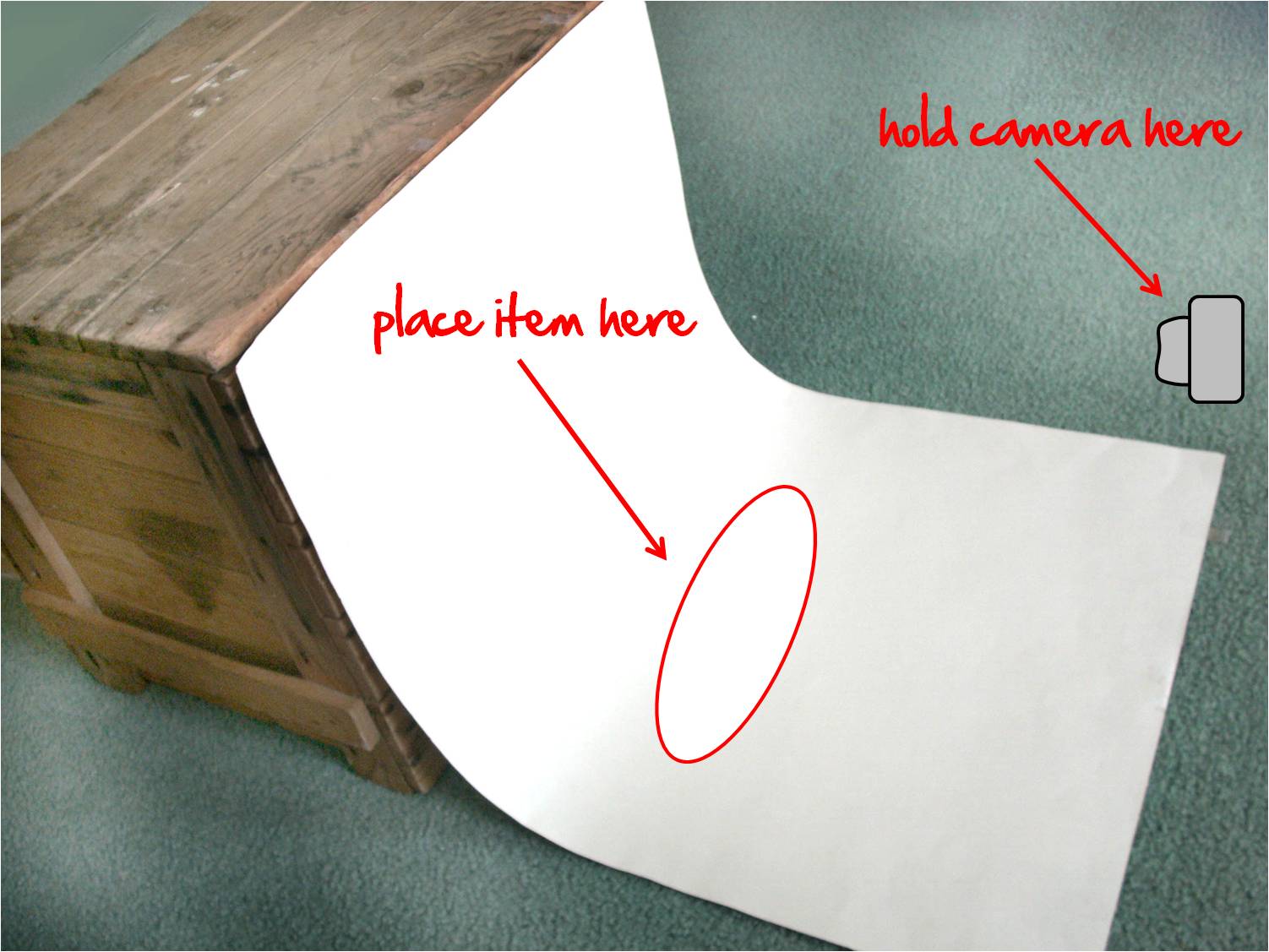
The simplest white background for small things I’ve ever used is a sheet of paper taped to a backing so it is half on a wall and half on the table/ground so you get that nice smooth transition and solid background.
8.5×11 for really small things like lego minifigs.
11×17 for slightly bigger things
poster board for larger things.All you need is a wall, floor (or wall and table) and good lighting (outdoor is ideal for color balance).
https://freshstitches.com/wp-content/uploads/2012/03/white-poster.jpg
-
04/09/2021 at 9:04 am #87363
There are some really excellent low cost software solutions. I use pixomatic (on an iphone) and it removes white background perfectly 90% of the time. It is fair more effective than the free background removal that comes up in the eBay app.
-
04/09/2021 at 9:23 am #87364
The bathtub thing is funny. Might be a bit of an ick factor if people notice. I have a screened porch with a tile floor that I use on occasion, sometimes with a cloth background but sometimes not, depending on the color contrast with the item. I did get an inquiry once about an item with the bare tile in the background, something to the effect of “I’m interested in buying but those photos aren’t taken on a floor, are they?”
Speaking of white background, though, my iPhone hates it. I’ve tried it different ways and the item is always too dark in the photo unless it is white or close to it itself, and then of course in that case there is not enough contrast to look good in thumbnail.
Thanks for the tip on Pixomatic, I’ll check it out.
-
04/09/2021 at 1:19 pm #87368
PhotoRoom app is free if you do one photo at a time, and $50 per year for the pro which can do about 100 photos at a time. I’ve been using it for a while now and I love it. It’s really effective! If you have a look closely at the photos in this listing, you can see the old background around the edges of the fluffy feathers. In this listing, even the zipper teeth are cut out. That’s how good this app is.
-
04/10/2021 at 6:29 am #87373
“PhotoRoom app is free…”
Even better. But I have to say, I really dislike the look of the background removal overall. To me it makes the item look fakey, like a digital stock photo that’s not a real photograph to start with. I need the context of a real background to process it as real.
-
04/10/2021 at 8:21 pm #87379
In the PhotoRoom app you can add a shadow, or a variety of backgrounds to your choice. So, for example, if you really hate a white background, you can take your photo in your cluttered (but well-lit) workroom, remove the background, and add a shadow to make it look more realistic. Or put it on a shelf, or a brick wall or an off-white background, or a beach, or… dozens of options.
-
04/10/2021 at 8:35 pm #87380
Hmm that might help. Anything to provide some perspective.
-
04/11/2021 at 5:26 am #87382
Mistake #1: forgetting to dust the object, so you have to spend five minutes cloning the spots out of the picture.
Mistake #2: Spending an extra two minutes trying to clone the dust off the computer screen.
-
04/12/2021 at 10:44 am #87421
Well, an incentive to keep the tub clean for sure.
-
-
AuthorPosts


- You must be logged in to reply to this topic.